Barclays · Shipped · Family banking · E-commerce · 2016

Sprout: chores that grow into savings

Chores earn rewards, parents approve, and half goes to real savings. A wish list gives kids something to save for.

What I’d measureChores approved, rewards saved, wishes reached.
A short loop of the app in use. Select it to try the real thing. Sample data.

The story in six lines

  1. GoalHelp a bank reach kids before their first account.
  2. ProblemChore money at home disappears into pockets, and saving has no goal., go to this part
  3. ApproachOne loop between two phones: a chore, a parent’s check, then savings that grow., go to this part
  4. DecisionTwo apps, a parent’s and a kid’s, over one app with modes. A sibling leaderboard was dropped., go to this part
  5. LaunchA 2015 concept for a bank, rebuilt in 2026 as working iPhone and Android apps., go to this part
  6. ResultWhat I’d measure: chores approved, rewards saved, wishes reached., go to this part

Select a line to read that part.
At a glance

Role
Lead product designer
When
A 2015 concept for a bank, rebuilt in 2026
Platforms
iPhone and Android
For
Parents, and kids 7 to 12

01 · The brief

Reach families early, and keep parents in charge

A bank wanted to reach kids before their first account. Chore money just disappears into pockets.

Sprout makes it visible: a chore, a check, and savings that grow.

A wish list gives saving a goal. No ads, no chat, no strangers.

Make money visible

Make effort count

Keep parents in charge

Give saving a goal

Keep it safe for kids

Decisions behind it

Five calls that shaped it

  1. The call I made

    Two apps, not one with modes

    Two apps keep each side simple: parents see what’s waiting, kids get one big button.

    What it cost: Two apps to build and keep in sync.

  2. What I dropped

    A leaderboard between siblings

    A leaderboard made chores a competition. A personal streak replaced it.

  3. The constraint

    When a parent says no

    A no is kind, keeps the money in the jar and invites a talk.

  4. The call I made

    Half of every reward saved first

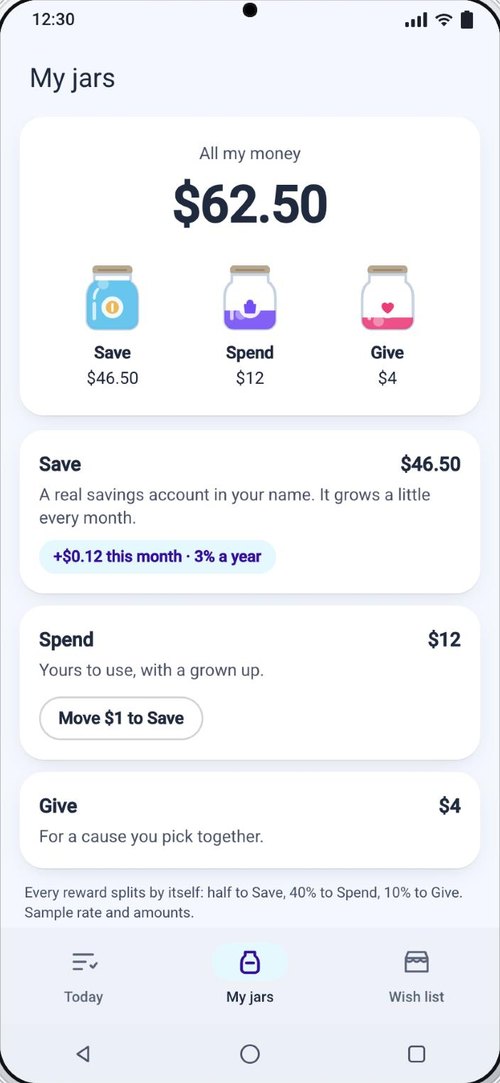
    Half of each reward goes to real savings first; Spend and Give stay the kid’s to split.

    What it cost: Less to spend now; the habit is the point.

  5. What I dropped

    One design for both phones

    Each phone follows its own platform; the family, jars and colors stay the same.

02 · The loop

One loop, handed back and forth between two phones

Each phone owns half of one loop.

The handoffs are the product: done, approved, saved, asked.

  • Parent · iPhone

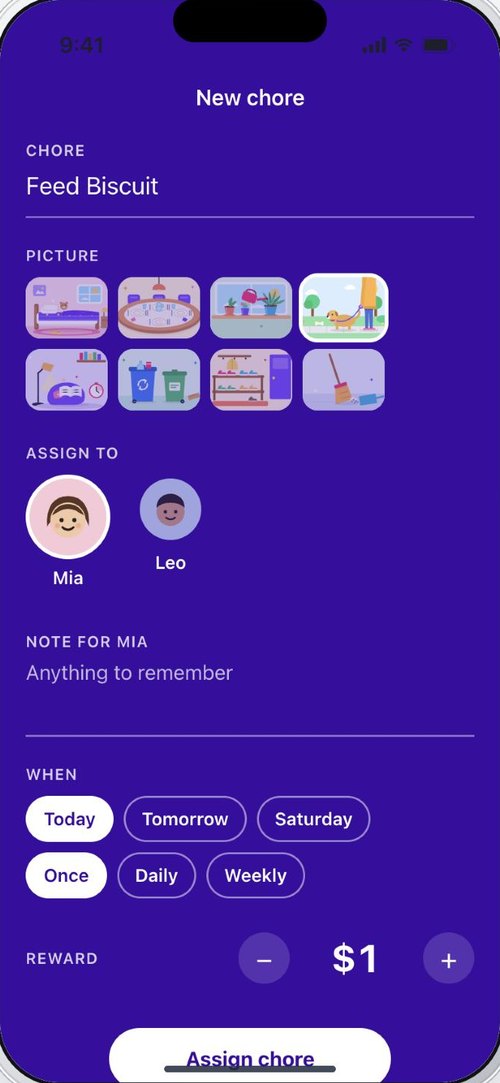
    1 · Assign. A parent sets the chore, a picture and the reward.

  • Mia · Android

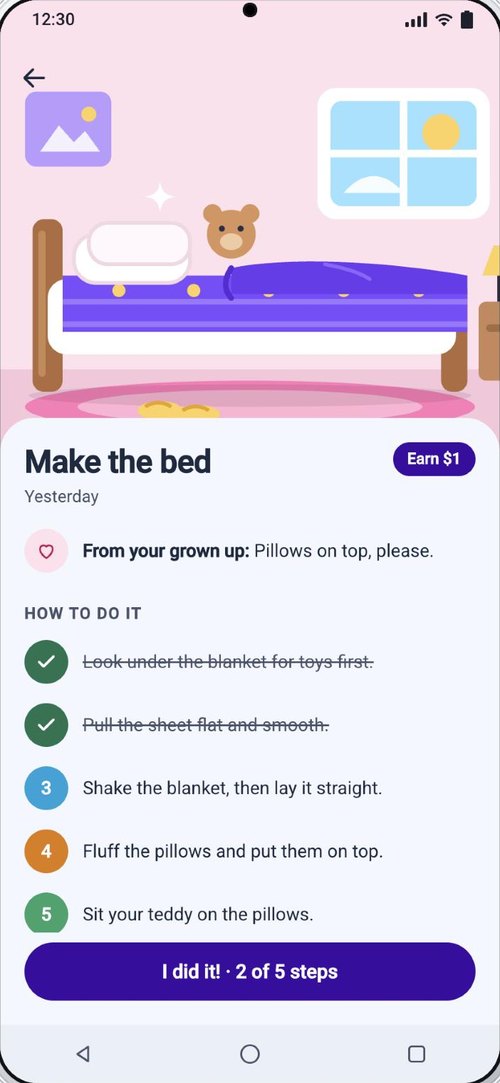
    2 · Do. Mia opens the chore: a big picture, the steps to tick and what to be careful of. Then I did it!

  • Parent · iPhone

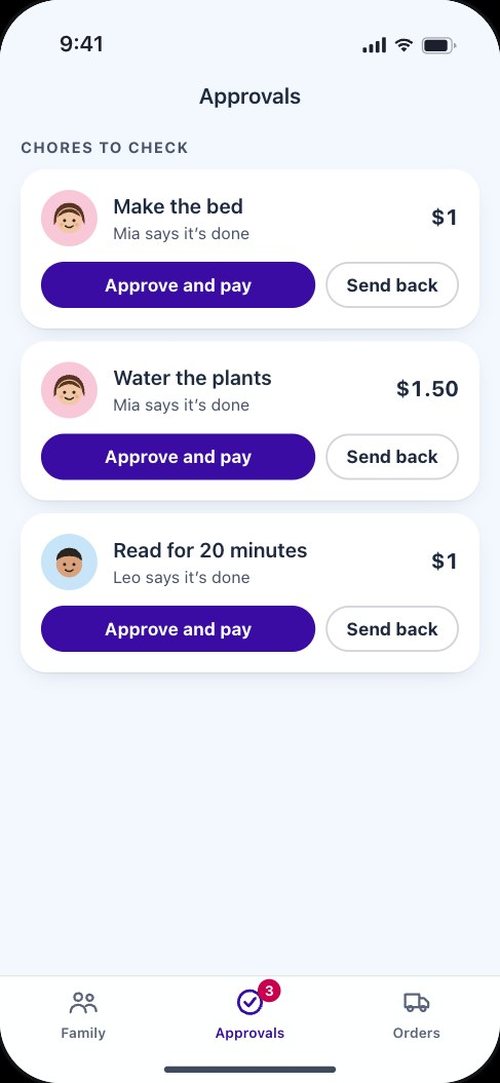
    3 · Check. Approve and pay, or send it back with a reason.

  • Mia · Android

    4 · Reward. The coins split into Save, Spend and Give. Save is a real savings account.

  • Mia · Android

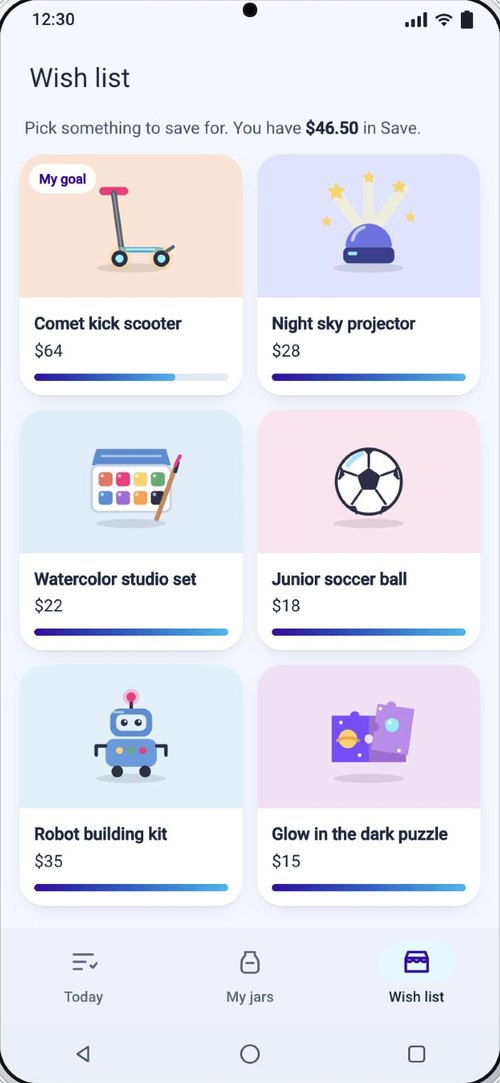
    5 · Wish. Every product shows how close Mia is, in her own money.

  • Parent · iPhone

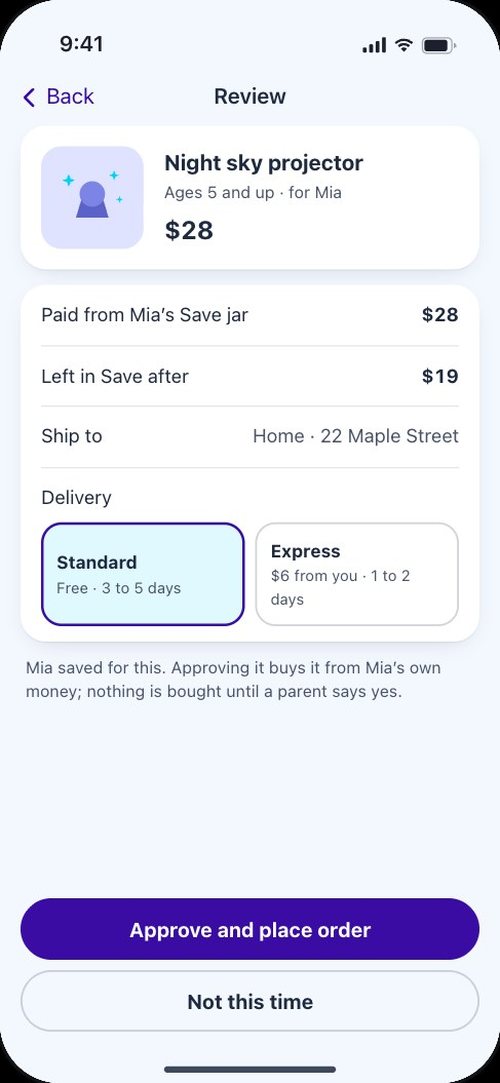
    6 · Buy. Mia asks, and only a parent can say yes and place the order.

Drag, swipe or scroll through the screens.

03 · Two apps, one family

Parents get control, kids get one big button

Parents want a list of what’s waiting. Kids want what to do now and what it’s worth.

So the kid’s app is pictures, big numbers and one tap per chore.

The parent’s app

  • Assign a chore with a picture, a note, a schedule and a reward
  • Approve and pay, or send it back with a reason
  • A gentle nudge when something is overdue
  • Approve every purchase, and track the order

The kid’s app

  • Today’s chores, each with one I did it! button
  • Three jars that fill as rewards arrive
  • A wish list with progress toward each thing
  • No ads, no chat, no strangers

04 · The wish list shop

Shopping where saving is the point

Every product shows how close the kid is, in chores left.

The kid asks; only a parent can buy, from the kid’s jar.

  • Comet kick scooter
  • Night sky projector
  • Watercolor set
  • Robot building kit

A wish list product · Android

Hi Mia!

6 days in a row

Saving for comet kick scooter

$46.50 of $64

My chores

Sent

Coming up

Ages 5 and up

Night sky projector

$28

Turns the ceiling into a sky full of stars.

My Save jar$28 of $28

You saved enough! Ask a grown up to buy it.

Mia has saved enough to ask.

05 · Safe by design

Nothing happens without a grown up

  • Every reward is approved. A parent pays or sends it back.
  • Every purchase is approved. Kids ask; parents buy.
  • Nothing to talk to. Only the family is in the app.
  • Real faces stay out. Kids are drawn, never photographed.

Orders · iPhone

Orders

Everything your kids saved up for, from asking to the doorstep.

Every purchase a parent approved, tracked from asked to delivered.

06 · iPhone and Android

One family, each platform’s own manners

Each screen follows its platform’s titles, back buttons and alerts.

The family, jars and colors stay the same.

First drawn in 2015 as redline specs for a bank, and rebuilt in code in 2026 with what eleven years taught me.

iPhone

Sprout

Good evening, Sam

Your kids have saved $64.50 together.

Each reward splits itself: half to Save, which is a real savings account in your kid’s name, 40% to Spend and 10% to Give.

Centered titles, Back, a tab bar.

Android

Sprout

Good evening, Sam

Your kids have saved $64.50 together.

Each reward splits itself: half to Save, which is a real savings account in your kid’s name, 40% to Spend and 10% to Give.

Left titles, arrows, a navigation bar.

07 · Next

What I’d test first

  • Can a 7 year old read the jars?

    Test with the youngest first.

  • Do parents keep up?

    Piled up approvals make rewards feel late.

  • Does the wish list make kids save?

    Compare saving with and without a goal.

Every name, price, product and the savings rate are made up for illustration.